Showing posts with label Linux Kernel. Show all posts
Showing posts with label Linux Kernel. Show all posts
Thursday, July 18, 2013


Monday, July 1, 2013
Linux Expert Series
Networking (PDF 2003,)
Namespaces and cgroups (PDF 2003,)
Linux Kernel Networking: Implementation and Theory (Apress)

Publishing December 27, 2013
ISBN13: 978-1-4302-6196-4
600 Pages
Monday, November 12, 2012
ARMvisor
ARMvisor is a Kernel-based virtual machine on ARM architecture.
The Blog of ARMvisor.
The presentation of ARMvisor in Linux Symposium 2012.
The Blog of ARMvisor.
The presentation of ARMvisor in Linux Symposium 2012.
Tuesday, August 28, 2012
Linux Block I/O Layer
Linux Block I/O Layer

Performance
Access Time = Command Overhead + Seek Time + Settle Time + Rotational Latency
Benchmark Tools
IOZone:
For example:
[ ]# /ust/bin/iozone -a > /root/iozone.log
[ ]# /usr/bin/iozone/Generate_Graphs /root/iozone.log
Fileop: Filesystem IO benchmarking tool

It looks like "NOOP" is the best one in this case.
Reference:
1.Linux SCSI Subsystem
2. 10 iozone Examples for Disk I/O Performance Measurement on Linux
3. Measuring & Optimizing I/O Performance

Performance
Access Time = Command Overhead + Seek Time + Settle Time + Rotational Latency
- Command Overhead: Disk controller process the disk request, that includes translating the LBA number into the CHS tuple.
- Seek Time: Moving the disk arms so the heads are aligned with the correct cylinder.
- Settle Time: To stabilize the disk heads before reading or writing data.
- Rotational Latency: Waiting for the requested sector to arrive at the location of the disk heads.
- Throughput
- Latency
Benchmark Tools
IOZone:
For example:
[ ]# /ust/bin/iozone -a > /root/iozone.log
[ ]# /usr/bin/iozone/Generate_Graphs /root/iozone.log
Fileop: Filesystem IO benchmarking tool

It looks like "NOOP" is the best one in this case.
Reference:
1.Linux SCSI Subsystem
2. 10 iozone Examples for Disk I/O Performance Measurement on Linux
3. Measuring & Optimizing I/O Performance
Sunday, June 12, 2011
Linux Kernel Tracer
# mount -t debugfs nodev /sys/kernel/debug
# cat /sys/kernel/debug/tracing/available_tracers
wakeup preemptirqsoff preemptoff irqsoff function sched_switch nop
# cat /sys/kernel/debug/tracing/current_tracer
nop
# echo sched_switch > /sys/kernel/debug/tracing/current_tracer
# cat /sys/kernel/debug/tracing/current_tracer
sched_switch
# cat /sys/kernel/debug/tracing/trace_options
noprint-parent nosym-offset nosym-addr noverbose
# echo print-parent > /sys/kernel/debug/tracing/trace_options
# echo 1 > /sys/kernel/debug/tracing/tracing_enabled
# cat /sys/kernel/debug/tracing/trace > /tmp/trace.txt
# echo 0 > /sys/kernel/debug/tracing/tracing_enabled
# cat /sys/kernel/debug/tracing/available_tracers
wakeup preemptirqsoff preemptoff irqsoff function sched_switch nop
# cat /sys/kernel/debug/tracing/current_tracer
nop
# echo sched_switch > /sys/kernel/debug/tracing/current_tracer
# cat /sys/kernel/debug/tracing/current_tracer
sched_switch
# cat /sys/kernel/debug/tracing/trace_options
noprint-parent nosym-offset nosym-addr noverbose
# echo print-parent > /sys/kernel/debug/tracing/trace_options
# echo 1 > /sys/kernel/debug/tracing/tracing_enabled
# cat /sys/kernel/debug/tracing/trace > /tmp/trace.txt
# echo 0 > /sys/kernel/debug/tracing/tracing_enabled
Thursday, June 9, 2011
OProfile on ARM Linux
How to compile OProfile
--target=arm-linux \
--host=arm-linux \
--build=i686-pc-linux-gnu \
--enable-shared \
--prefix=/home/oprofile/binutils-stable_bin \
--disable-nls --disable-poison-system-directories
[ ]#make
[ ]#make install
--with-kernel-support \
--disable-optimization \
--disable-werror \
--target=arm-linux \
--host=arm-linux \
--build=i686-pc-linux-gnu \
--enable-static \
--with-binutils=/home/oprofile/binutils-stable_bin \
--prefix=/home/oprofile/oprofile-0.9.6_bin
[ ]#make
How to use OProfile on ARM platform
Default: timer mode, $ modprobe oprofile timer=1
$ opcontrol --reset
$ opcontrol --init
$ opcontrol --start --vmlinux=/tmp/vmlinux --session-dir=/tmp/linux
$ opcontrol --start-daemon
$ opcontrol --dump
$ opcontrol --save=output
$ opreport --session-dir=/tmp/linux session:output -l image:/tmp/vmlinux
Sample Rate = HZ
OProfile with performance counter
$ opcontrol --callgraph=8 --separate=kernel --vmlinux=/boot/vmlinux
$ opcontrol --event=CPU_CYCLES:100000:0:1:1 \
--event=L1D_CACHE:100000:0:1:1 \
--event=L2D_CACHE:10000:0:1:1 \
--event=BUS_ACCESS:100000:0:1:1 \
--event=BUS_CYCLES:100000:0:1:1 \
--event=UNALIGNED_LDST_RETIRED:10000:0:1:1
$ opcontrol --init
$ opcontrol --reset
$ opcontrol --start-daemon
$ opcontrol --status
$ opcontrol --start
$ opcontrol --dump
$ opreport
Sample Rate = (CPU frequency in MHz) / (CPU_CYCLES count) / 64.
The default value of CPU_CYCLES = 100000. The CPU_CYCLES can be changed as following example “--event=CPU_CYCLES:125000".
If CPU is running in 800MHz, the sample rate is 800MHz / 100000 / 64 = 125 samples per second.
Reference:
http://friendalways.blogspot.com/2009/11/oprofile-on-arm-linux.html
binutils
[ ]#./configure \--target=arm-linux \
--host=arm-linux \
--build=i686-pc-linux-gnu \
--enable-shared \
--prefix=/home/oprofile/binutils-stable_bin \
--disable-nls --disable-poison-system-directories
[ ]#make
[ ]#make install
oprofile-0.9.6
[ ]#./configure --with-linux=/home/linux-2.6.35.12-cavm1 \--with-kernel-support \
--disable-optimization \
--disable-werror \
--target=arm-linux \
--host=arm-linux \
--build=i686-pc-linux-gnu \
--enable-static \
--with-binutils=/home/oprofile/binutils-stable_bin \
--prefix=/home/oprofile/oprofile-0.9.6_bin
[ ]#make
How to use OProfile on ARM platform
Default: timer mode, $ modprobe oprofile timer=1
$ opcontrol --reset
$ opcontrol --init
$ opcontrol --start --vmlinux=/tmp/vmlinux --session-dir=/tmp/linux
$ opcontrol --start-daemon
$ opcontrol --dump
$ opcontrol --save=output
$ opreport --session-dir=/tmp/linux session:output -l image:/tmp/vmlinux
Sample Rate = HZ
OProfile with performance counter
$ opcontrol --callgraph=8 --separate=kernel --vmlinux=/boot/vmlinux
$ opcontrol --event=CPU_CYCLES:100000:0:1:1 \
--event=L1D_CACHE:100000:0:1:1 \
--event=L2D_CACHE:10000:0:1:1 \
--event=BUS_ACCESS:100000:0:1:1 \
--event=BUS_CYCLES:100000:0:1:1 \
--event=UNALIGNED_LDST_RETIRED:10000:0:1:1
$ opcontrol --init
$ opcontrol --reset
$ opcontrol --start-daemon
$ opcontrol --status
$ opcontrol --start
$ opcontrol --dump
$ opreport
Sample Rate = (CPU frequency in MHz) / (CPU_CYCLES count) / 64.
The default value of CPU_CYCLES = 100000. The CPU_CYCLES can be changed as following example “--event=CPU_CYCLES:125000".
If CPU is running in 800MHz, the sample rate is 800MHz / 100000 / 64 = 125 samples per second.
Reference:
http://friendalways.blogspot.com/2009/11/oprofile-on-arm-linux.html
Tuesday, February 22, 2011
RCU
Read-Copy Update (RCU)
As an example of real-world use of RCU, consider the network routing tables. Every outgoing packet requires a check of the routing tables to determine which interface should be used. The check is fast, and, once the kernel has found the target interface, it no longer needs the routing table entry. RCU allows route lookups to be performed without locking, with significant performance benefits. The Starmode radio IP driver in the kernel also uses RCU to keep track of its list of devices. (Copy from LDD3)
As an example of real-world use of RCU, consider the network routing tables. Every outgoing packet requires a check of the routing tables to determine which interface should be used. The check is fast, and, once the kernel has found the target interface, it no longer needs the routing table entry. RCU allows route lookups to be performed without locking, with significant performance benefits. The Starmode radio IP driver in the kernel also uses RCU to keep track of its list of devices. (Copy from LDD3)
Tuesday, January 4, 2011
SLAB/SLUB/SLOB
Linux Memory Management
SLAB Allocaror

SLUB Allocaror
SLOB Allocaror
Reference:
Linux Kernel Heap Tampering Detection
- Buddy System
- Slab Allocator
- Allocate 4KB (PAGE_SIZE)
- Page based memory
- Allocate smaller than 4KB
- Object based memory
SLAB Allocaror

SLUB Allocaror
SLOB Allocaror
Reference:
Wednesday, August 18, 2010
Linux Network
Application Layer
TCP/IP Layer
Driver Layer
Testing
Sample CodeLAN Ethernet Maximum Rates, Generation, Capturing, Monitoring
TCP/IP Layer
Driver Layer
Testing
Sample CodeLAN Ethernet Maximum Rates, Generation, Capturing, Monitoring
Tuesday, March 2, 2010
AMP System
AMP System Architecture for ARM11 MPCore
Separate CPUs with separate OS. For example, Linux runs on CPU0 and uCode runs on CPU1.

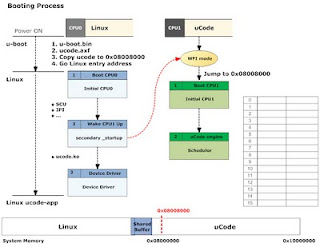
Separate CPUs with separate OS. For example, Linux runs on CPU0 and uCode runs on CPU1.


Tuesday, October 27, 2009
Tuesday, September 29, 2009
Linux Timer
Time Stamp: Jiffy
Time Stamp: Nanosecond
Clock Base: (1) Monotonic Clock (2) Real Time Clock
Power Management
Objects for Time Management
Clock Sources
Clock Event Devices
Tick Devices
Saturday, September 12, 2009
Linux IO Scheduler
The IO Schedulers
No-op Scheduler
This scheduler only implements request merging.
Anticipatory IO Scheduler (AS)
This scheduler implements request merging, a one-way elevator, read and write request batching, and attempts some anticipatory reads by holding off a bit after a read batch if it thinks a user is going to ask for more data.
This is optimised for the single disk systems.
Deadline Scheduler
The scheduler implements request merging, a one-way elevator, and imposes a deadline on all operations to prevent resource starvation.
Complete Fair Queueing Scheduler (CFQ)
The scheduler implements both request merging and the elevator, and attempts to give all users of a particular device the same number of IO requests over a particular time interval.
References:
Linux I/O Schedulers
This scheduler only implements request merging.
This scheduler implements request merging, a one-way elevator, read and write request batching, and attempts some anticipatory reads by holding off a bit after a read batch if it thinks a user is going to ask for more data.
This is optimised for the single disk systems.
The scheduler implements request merging, a one-way elevator, and imposes a deadline on all operations to prevent resource starvation.
The scheduler implements both request merging and the elevator, and attempts to give all users of a particular device the same number of IO requests over a particular time interval.
References:
Linux I/O Schedulers
Thursday, August 20, 2009
CPU affinity
Soft CPU affinity
Processes do not frequently migrate between processors.
Hard CPU affinity
Processes run on processors you specify.
The Linux kernel API:
To alter the bitmask
sched_set_affinity()
To view the current bitmask
sched_get_affinity()
Processes do not frequently migrate between processors.
Hard CPU affinity
Processes run on processors you specify.
The Linux kernel API:
sched_set_affinity()
sched_get_affinity()
Thursday, June 25, 2009
Linux Kernel Reading Book List
1. Professional Linux Kernel Architecture (PDF)

This book is focus on kernel 2.6.24 ~ 2.6.26.
2.

This book is focus on kernel 2.6.24 ~ 2.6.26.
2.
Wednesday, June 10, 2009
Tuesday, June 9, 2009
Cache
Write-through
Write-back
The value kept in the backing store should be up-to-
date with any changes made to the version stored
in the cache, but only to the point that it is possible
to ensure that any read requests to the version in the
backing store (e.g., from another processor) return
the most recently written value stored in the cache.
Two typical mechanisms used in general-purpose
caches to effect this responsibility are write-back and
write-through policies. When writing to a cache, the
backing store is implicitly updated, but when? Two
obvious choices are immediately and later; the first
is write-through, and the second is write back.
outer_inv - /* invalidate only */
outer_clean - /* writeback only */
outer_flush - /* writeback and invalidate */
Write-back
The value kept in the backing store should be up-to-
date with any changes made to the version stored
in the cache, but only to the point that it is possible
to ensure that any read requests to the version in the
backing store (e.g., from another processor) return
the most recently written value stored in the cache.
Two typical mechanisms used in general-purpose
caches to effect this responsibility are write-back and
write-through policies. When writing to a cache, the
backing store is implicitly updated, but when? Two
obvious choices are immediately and later; the first
is write-through, and the second is write back.
outer_inv - /* invalidate only */
outer_clean - /* writeback only */
outer_flush - /* writeback and invalidate */
Wednesday, May 20, 2009
RTC on Linux
Real Time Clock
RTC Device Driver
Download patch
RTC Utility
[ ]# mknod /dev/rtc0 c 254 0
[ ]# date 2009.05.20-12:34:56
[ ]# hwclock -w
[ ]# cat /proc/driver/rtc
[ ]#
RTC Device Driver
Download patch
RTC Utility
[ ]# mknod /dev/rtc0 c 254 0
[ ]# date 2009.05.20-12:34:56
[ ]# hwclock -w
[ ]# cat /proc/driver/rtc
[ ]#
Monday, April 6, 2009
Linux SMP Kernel boot-up messages on ARM11 MPCore based Platform
Linux version 2.6.27-arm1 (scott.shu@gmail.com) (gcc version 4.3.2 (G9
CPU: ARMv6-compatible processor [410fb020] revision 0 (ARMv7), cr=00c5387f
Machine: S---- ARM11 MPCore
Memory policy: ECC disabled, Data cache writeback
On node 0 totalpages: 65536
free_area_init_node: node 0, pgdat c022a8c0, node_mem_map c0261000
DMA zone: 65024 pages, LIFO batch:15
CPU0: D VIPT write-back cache
CPU0: I cache: 32768 bytes, associativity 4, 32 byte lines, 256 sets
CPU0: D cache: 32768 bytes, associativity 4, 32 byte lines, 256 sets
Built 1 zonelists in Zone order, mobility grouping on. Total pages: 65024
Kernel command line: root=/dev/ram0 rw init=/linuxrc mem=256M console=ttyS0,3840
PID hash table entries: 1024 (order: 10, 4096 bytes)
Console: colour dummy device 80x30
console [ttyS0] enabled
Dentry cache hash table entries: 32768 (order: 5, 131072 bytes)
Inode-cache hash table entries: 16384 (order: 4, 65536 bytes)
Memory: 256MB = 256MB total
Memory: 254592KB available (2008K code, 281K data, 104K init)
Calibrating delay loop... 104.24 BogoMIPS (lpj=521216)
Mount-cache hash table entries: 512
CPU: Testing write buffer coherency: ok
CNS3000: no. of cores (4) greater than configured maximum of 2 - clipping
Calibrating local timer... 131.10MHz.
CPU1: Booted secondary processor
CPU1: D VIPT write-back cache
CPU1: I cache: 32768 bytes, associativity 4, 32 byte lines, 256 sets
CPU1: D cache: 32768 bytes, associativity 4, 32 byte lines, 256 sets
Calibrating delay loop... 104.65 BogoMIPS (lpj=523264)
Brought up 2 CPUs
SMP: Total of 2 processors activated (208.89 BogoMIPS).
CPU0 attaching sched-domain:
domain 0: span 0-1 level CPU
groups: 0 1
CPU1 attaching sched-domain:
domain 0: span 0-1 level CPU
groups: 1 0
net_namespace: 596 bytes
NET: Registered protocol family 16
NET: Registered protocol family 2
IP route cache hash table entries: 2048 (order: 1, 8192 bytes)
TCP established hash table entries: 8192 (order: 4, 65536 bytes)
TCP bind hash table entries: 8192 (order: 4, 65536 bytes)
TCP: Hash tables configured (established 8192 bind 8192)
TCP reno registered
NET: Registered protocol family 1
checking if image is initramfs...it isn't (no cpio magic); looks like an initrd
Freeing initrd memory: 2571K
JFFS2 version 2.2. (NAND) © 2001-2006 Red Hat, Inc.
msgmni has been set to 502
io scheduler noop registered
io scheduler deadline registered (default)
Serial: 8250/16550 driver1 ports, IRQ sharing disabled
serial8250: ttyS0 at MMIO 0x78000000 (irq = 37) is a 16550A
brd: module loaded
loop: module loaded
TCP cubic registered
NET: Registered protocol family 17
Bridge firewalling registered
802.1Q VLAN Support v1.8 Ben Greear
All bugs added by David S. Miller
VFP support v0.3: implementor 41 architecture 1 part 20 variant b rev 3
RAMDISK: Compressed image found at block 0
VFS: Mounted root (ext2 filesystem).
Freeing init memory: 104K
# cat /proc/interrupts
CPU0 CPU1
32: 50 0 GIC Timer Tick
37: 4542 0 GIC serial
IPI: 334 493
LOC: 25087 25099
Err: 0
# cat /proc/cpuinfo
Processor : ARMv6-compatible processor rev 0 (v6l)
processor : 0
BogoMIPS : 104.24
processor : 1
BogoMIPS : 104.65
Features : swp half thumb fastmult vfp edsp java
CPU implementer : 0x41
CPU architecture: 7
CPU variant : 0x0
CPU part : 0xb02
CPU revision : 0
Cache type : write-back
Cache clean : cp15 c7 ops
Cache lockdown : format C
Cache format : Harvard
I size : 32768
I assoc : 4
I line length : 32
I sets : 256
D size : 32768
D assoc : 4
D line length : 32
D sets : 256
Hardware : S---- ARM11 MPCore
Revision : 0000
Serial : 0000000000000000
CPU: ARMv6-compatible processor [410fb020] revision 0 (ARMv7), cr=00c5387f
Machine: S---- ARM11 MPCore
Memory policy: ECC disabled, Data cache writeback
On node 0 totalpages: 65536
free_area_init_node: node 0, pgdat c022a8c0, node_mem_map c0261000
DMA zone: 65024 pages, LIFO batch:15
CPU0: D VIPT write-back cache
CPU0: I cache: 32768 bytes, associativity 4, 32 byte lines, 256 sets
CPU0: D cache: 32768 bytes, associativity 4, 32 byte lines, 256 sets
Built 1 zonelists in Zone order, mobility grouping on. Total pages: 65024
Kernel command line: root=/dev/ram0 rw init=/linuxrc mem=256M console=ttyS0,3840
PID hash table entries: 1024 (order: 10, 4096 bytes)
Console: colour dummy device 80x30
console [ttyS0] enabled
Dentry cache hash table entries: 32768 (order: 5, 131072 bytes)
Inode-cache hash table entries: 16384 (order: 4, 65536 bytes)
Memory: 256MB = 256MB total
Memory: 254592KB available (2008K code, 281K data, 104K init)
Calibrating delay loop... 104.24 BogoMIPS (lpj=521216)
Mount-cache hash table entries: 512
CPU: Testing write buffer coherency: ok
CNS3000: no. of cores (4) greater than configured maximum of 2 - clipping
Calibrating local timer... 131.10MHz.
CPU1: Booted secondary processor
CPU1: D VIPT write-back cache
CPU1: I cache: 32768 bytes, associativity 4, 32 byte lines, 256 sets
CPU1: D cache: 32768 bytes, associativity 4, 32 byte lines, 256 sets
Calibrating delay loop... 104.65 BogoMIPS (lpj=523264)
Brought up 2 CPUs
SMP: Total of 2 processors activated (208.89 BogoMIPS).
CPU0 attaching sched-domain:
domain 0: span 0-1 level CPU
groups: 0 1
CPU1 attaching sched-domain:
domain 0: span 0-1 level CPU
groups: 1 0
net_namespace: 596 bytes
NET: Registered protocol family 16
NET: Registered protocol family 2
IP route cache hash table entries: 2048 (order: 1, 8192 bytes)
TCP established hash table entries: 8192 (order: 4, 65536 bytes)
TCP bind hash table entries: 8192 (order: 4, 65536 bytes)
TCP: Hash tables configured (established 8192 bind 8192)
TCP reno registered
NET: Registered protocol family 1
checking if image is initramfs...it isn't (no cpio magic); looks like an initrd
Freeing initrd memory: 2571K
JFFS2 version 2.2. (NAND) © 2001-2006 Red Hat, Inc.
msgmni has been set to 502
io scheduler noop registered
io scheduler deadline registered (default)
Serial: 8250/16550 driver1 ports, IRQ sharing disabled
serial8250: ttyS0 at MMIO 0x78000000 (irq = 37) is a 16550A
brd: module loaded
loop: module loaded
TCP cubic registered
NET: Registered protocol family 17
Bridge firewalling registered
802.1Q VLAN Support v1.8 Ben Greear
All bugs added by David S. Miller
VFP support v0.3: implementor 41 architecture 1 part 20 variant b rev 3
RAMDISK: Compressed image found at block 0
VFS: Mounted root (ext2 filesystem).
Freeing init memory: 104K
# cat /proc/interrupts
CPU0 CPU1
32: 50 0 GIC Timer Tick
37: 4542 0 GIC serial
IPI: 334 493
LOC: 25087 25099
Err: 0
# cat /proc/cpuinfo
Processor : ARMv6-compatible processor rev 0 (v6l)
processor : 0
BogoMIPS : 104.24
processor : 1
BogoMIPS : 104.65
Features : swp half thumb fastmult vfp edsp java
CPU implementer : 0x41
CPU architecture: 7
CPU variant : 0x0
CPU part : 0xb02
CPU revision : 0
Cache type : write-back
Cache clean : cp15 c7 ops
Cache lockdown : format C
Cache format : Harvard
I size : 32768
I assoc : 4
I line length : 32
I sets : 256
D size : 32768
D assoc : 4
D line length : 32
D sets : 256
Hardware : S---- ARM11 MPCore
Revision : 0000
Serial : 0000000000000000
Monday, March 23, 2009
Floating Point on Linux
Hardware FPU
VFP - VectorFloating Point
Software FPE (Floating Point Emulation)
NWFPE - NetWinder Floating Point Emulator
FASTFPE - FAST Floating Point Emulator
Performance:
Test program: fp_bench (fp_bench.tar.gz)
VFP - VectorFloating Point
Software FPE (Floating Point Emulation)
NWFPE - NetWinder Floating Point Emulator
FASTFPE - FAST Floating Point Emulator
Performance:
Test program: fp_bench (fp_bench.tar.gz)
Subscribe to:
Posts (Atom)